
Odoo differs from other ERP systems through its modular architecture, customization flexibility, integrated business applications, and scalability. Compared with SAP, NetSuite, and Microsoft Dynamics 365, Odoo offers a more flexible ERP model, while each competitor brings strengths in enterprise depth, cloud ERP structure, or ecosystem integration. This SK Technology guide compares Odoo with leading ERP platforms across functionality, integration, usability, implementation, scalability, and cost to help readers understand which system best fits different business needs.
What Makes Odoo Different From Other ERP Systems?
Odoo ERP stands out for its modular architecture, open-source foundation, customization, integrated business applications, and business agility. Unlike more rigid traditional ERP systems, Odoo allows businesses to centralize operations, automate workflows, and expand functionality as requirements grow.
Modular ERP Architecture
Odoo uses a modular ERP structure, allowing businesses to add applications such as accounting, CRM, sales, inventory, manufacturing, HR, projects, and e-commerce as operational needs expand. This supports scalability without requiring every function from the start.
Open-Source Foundation and Customization
Odoo’s open-source foundation gives organizations greater flexibility to adapt workflows, processes, integrations, and business logic. This makes the ERP system suitable for businesses that require more control over customization and process design.
Integrated Business Applications
Odoo connects core business functions within one ERP platform, including accounting, CRM, sales management, inventory management, manufacturing, HR, project management, and e-commerce. Centralized data improves automation, reporting, and business visibility across departments.
Flexibility and Business Agility
Odoo combines modularity and customization to support changing business processes, new users, additional modules, and operational growth. This flexibility can help SMEs and growing businesses adapt their ERP environment without replacing the entire system.
Odoo vs SAP
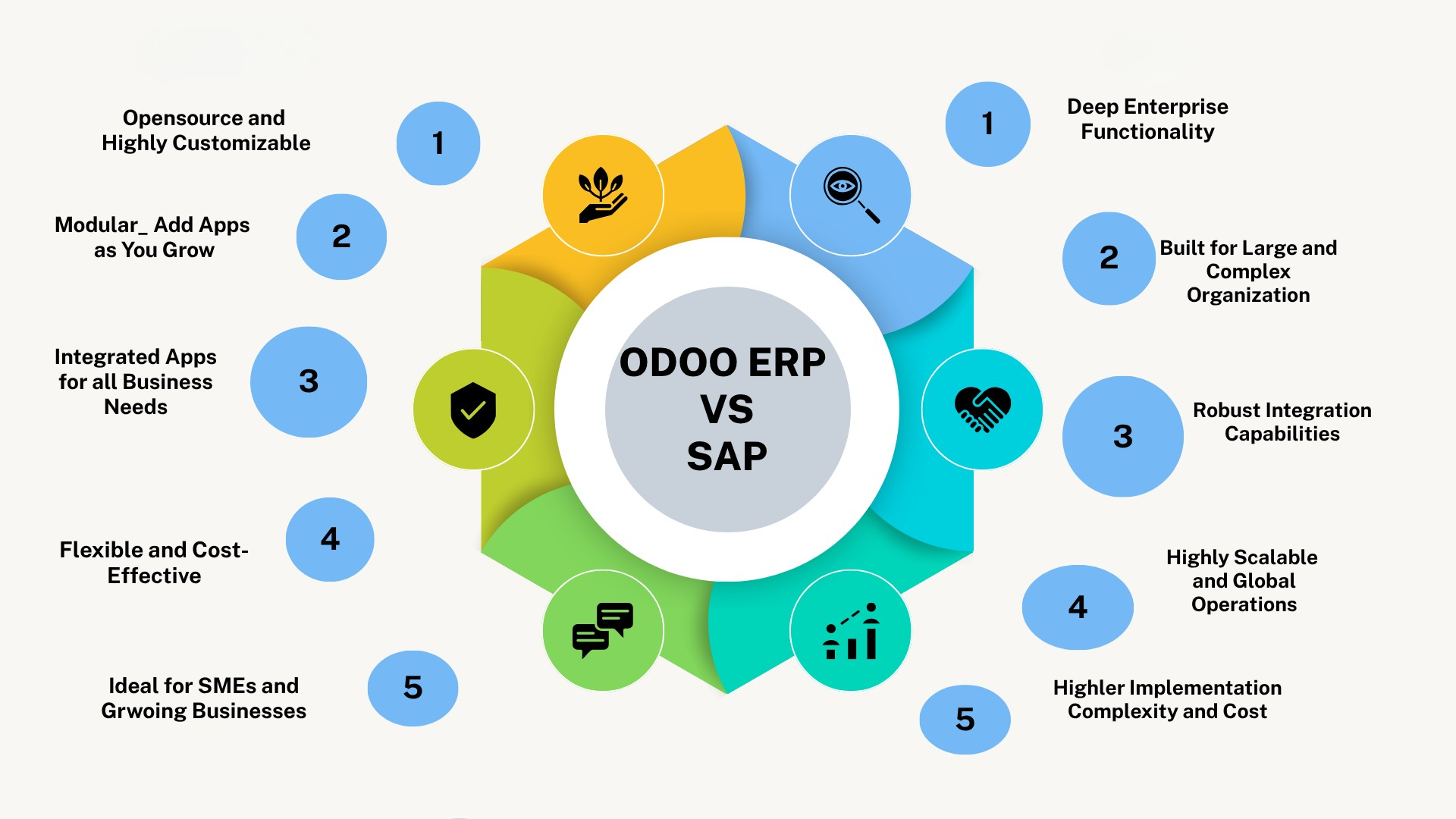
Odoo vs SAP is mainly a comparison between flexibility and business agility and enterprise process depth and scale. Odoo is modular and customizable, while SAP is built for broader, more complex enterprise operations.
Functionality
Odoo combines accounting, CRM, sales, inventory, manufacturing, HR, projects, and e-commerce in one suite, as shown in the Odoo Editions overview. SAP provides deeper enterprise functionality across finance, manufacturing, procurement, and supply chain.
Customization
Odoo offers strong flexibility because its Community edition is open source, allowing businesses to adapt modules, workflows, and integrations. SAP also supports extensibility, but typically within a more structured enterprise environment.
Integration
Odoo connects native applications and supports external integrations, with API access available in supported plans. SAP is designed for broader enterprise integration across complex systems and departments.
Scalability
Odoo can scale through additional users, modules, workflows, and business functions. SAP is particularly strong for large organizations managing complex, multi-department operations and enterprise-scale processes.
Ease of Use
Odoo focuses on a unified interface across integrated applications. SAP supports deeper process complexity, so usability and training requirements can be higher depending on the implementation scope.
Implementation Complexity
Odoo implementation depends on modules, integrations, migration, and customization. Its implementation services can include business analysis, data import, development, and training. SAP projects are often more complex because of broader enterprise requirements.
Pricing and Total Cost
Odoo uses user-based commercial plans, while Odoo pricing separates software subscription from implementation and customization costs. For both Odoo and SAP, businesses should evaluate total cost of ownership, including licensing, implementation, integrations, training, and support.
Which Type of Business Fits Each ERP?
Odoo is well suited to SMEs and growing businesses that value modularity, customization, and flexibility. SAP is better aligned with large or complex enterprises that need deep functionality, governance, and enterprise-scale integration.
Odoo vs Oracle NetSuite
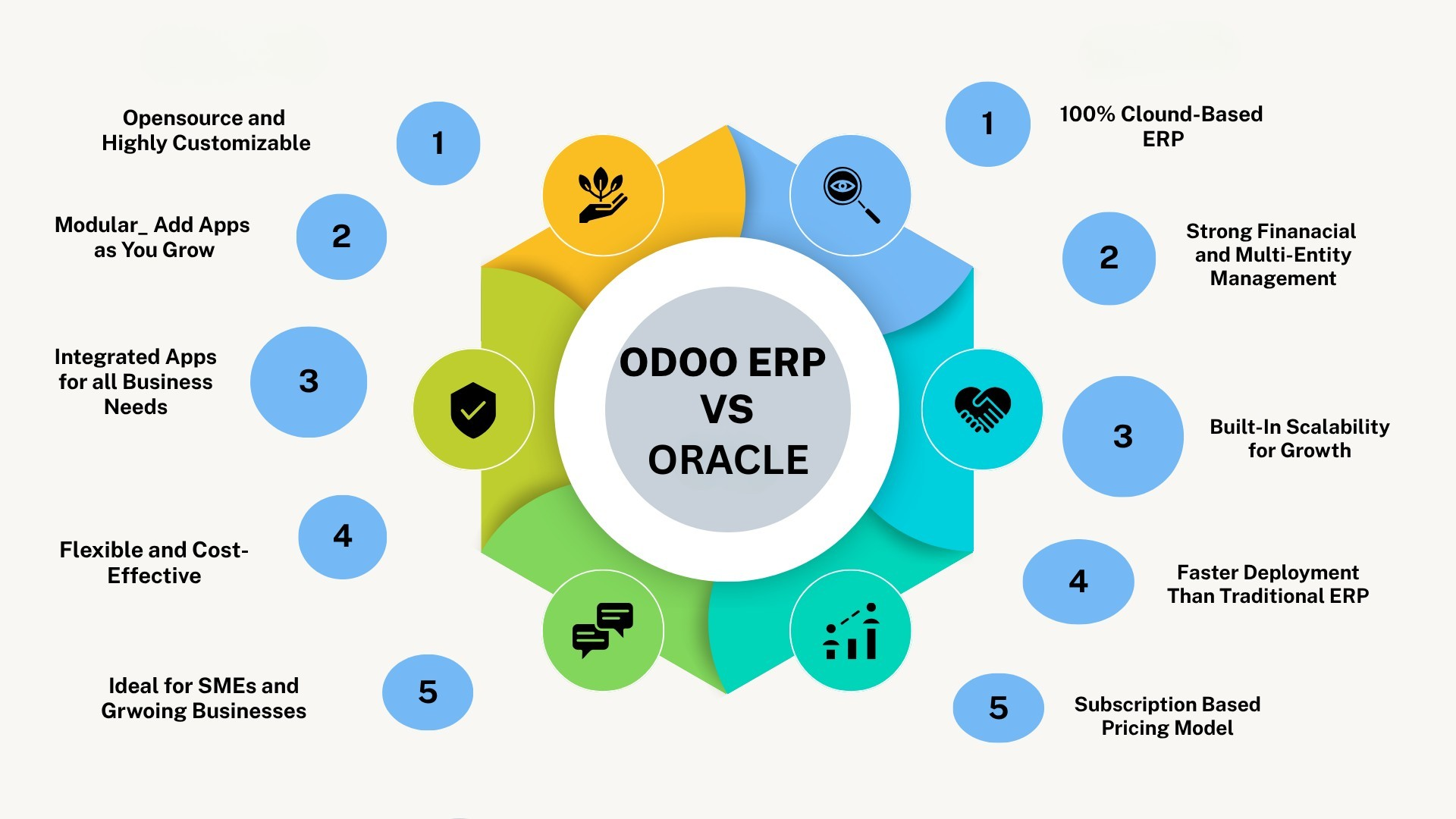
Odoo vs NetSuite is mainly a comparison between open customization and a structured cloud SaaS environment. Odoo offers a modular ERP model with open-source foundations, while Oracle NetSuite provides a unified cloud ERP platform designed around standardized financial and operational processes.
ERP Architecture
Odoo uses a modular architecture where businesses can add applications as requirements grow, and its Community edition is open source. NetSuite is a cloud-based ERP suite that combines financial management, inventory, order management, procurement, and other operations within one platform.
Customization
Odoo offers strong flexibility through custom modules, workflows, Odoo Studio, and development tools. Its custom plan supports Studio, custom development, and external APIs. NetSuite also supports configurable workflows and extensions, but customization operates within its structured SaaS environment.
Integration
Odoo combines native applications with external integrations and API connectivity. NetSuite supports integrations with external systems and is moving toward modern REST-based services; its current developer documentation notes the transition away from new SOAP endpoints toward REST web services.
Functionality
Odoo covers accounting, CRM, sales, inventory, manufacturing, HR, projects, and e-commerce. NetSuite provides broad ERP functionality across accounting, inventory, order management, procurement, production, supply chain, and reporting, as outlined in its official NetSuite ERP overview.
Scalability
Odoo can scale through additional users, modules, workflows, and business functions. NetSuite is particularly suited to organizations requiring cloud-based multi-entity operations, consolidated financial reporting, and expanding operational processes.
Implementation
Odoo implementation complexity depends on modules, integrations, data migration, and customization. NetSuite implementations are generally structured around configuring its cloud ERP environment, business processes, integrations, and data requirements.
Pricing
Odoo uses user-based commercial plans, with its official pricing separating subscription costs from implementation and some customization expenses. NetSuite follows a subscription SaaS model, with total cost influenced by required modules, users, implementation scope, integrations, and ongoing support.
Which Type of Business Fits Each Platform?
Odoo can suit SMEs and growing businesses that prioritize customization, modularity, and flexible workflows. NetSuite is particularly relevant for growing and multi-entity organizations that prefer a structured cloud ERP environment with strong financial and operational management capabilities.
Odoo vs Microsoft Dynamics 365
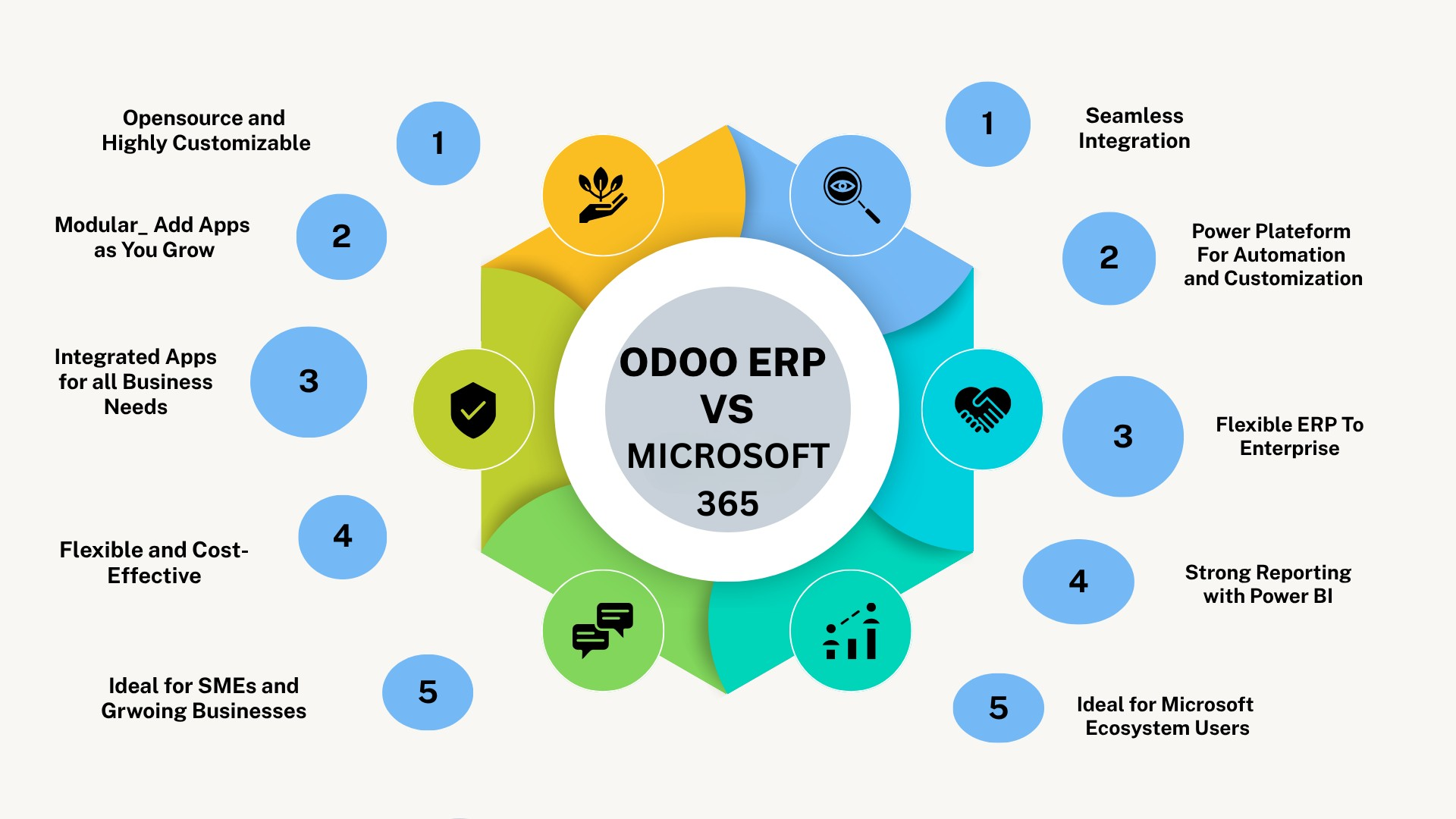
Odoo vs Microsoft Dynamics 365 is mainly a comparison between flexibility and an integrated ERP suite and deep Microsoft ecosystem integration. Odoo brings business applications into one modular platform, while Dynamics 365 includes products such as Business Central, Finance, and Supply Chain Management for different levels of business complexity.
Functionality
Odoo combines accounting, CRM, sales, inventory, manufacturing, HR, projects, and e-commerce within one suite. Microsoft describes Dynamics 365 Business Central as a business management platform covering finance, supply chain, manufacturing, projects, and service operations.
Microsoft Ecosystem Integration
Dynamics 365 has a clear advantage for organizations already using Microsoft products. Its Business Central integration framework connects with Outlook, Excel, Teams, Word, OneDrive, Power BI, Power Apps, and Power Automate. Odoo can integrate with external platforms, but it is not centered on the Microsoft ecosystem.
Customization
Odoo provides flexibility through its modular architecture and open-source Community edition, alongside enterprise customization capabilities. Dynamics 365 supports customization through Microsoft Power Platform, Dataverse, extensions, and related development tools.
Ease of Use
Odoo emphasizes a unified interface across its integrated applications. Dynamics 365 can feel particularly familiar to organizations already working with Microsoft 365 tools because ERP data and workflows can connect with applications employees use daily.
Integration
Odoo supports external systems through APIs and custom integrations, with external API access available under its Custom plan. Dynamics 365 offers strong integration through Dataverse, REST APIs, Power Platform, and Microsoft's broader application ecosystem.
Scalability
Odoo can scale through additional users, modules, workflows, and business functions. Microsoft positions Business Central for small and mid-sized organizations, while other Dynamics 365 applications address more complex enterprise requirements.
Implementation
Implementation complexity for both systems depends on data migration, integrations, customization, users, and business processes. Odoo's modular approach can support phased deployments, while Dynamics 365 implementation requirements vary significantly depending on whether the organization uses Business Central or larger enterprise applications.
Pricing
Odoo follows user-based commercial plans, while Dynamics products use application- and user-based licensing. Microsoft's Business Central pricing structure separates Essentials, Premium, and Team Member licenses. Total cost should also include implementation, integration, customization, training, and support.
Which Type of Business Fits Each Platform?
Odoo can suit SMEs and growing businesses that prioritize modularity, customization, integrated applications, and flexible workflows. Dynamics 365 is especially relevant for organizations already invested in Microsoft 365, Power Platform, Azure, or other Microsoft technologies and want their ERP environment closely connected to that ecosystem.
Odoo vs QuickBooks
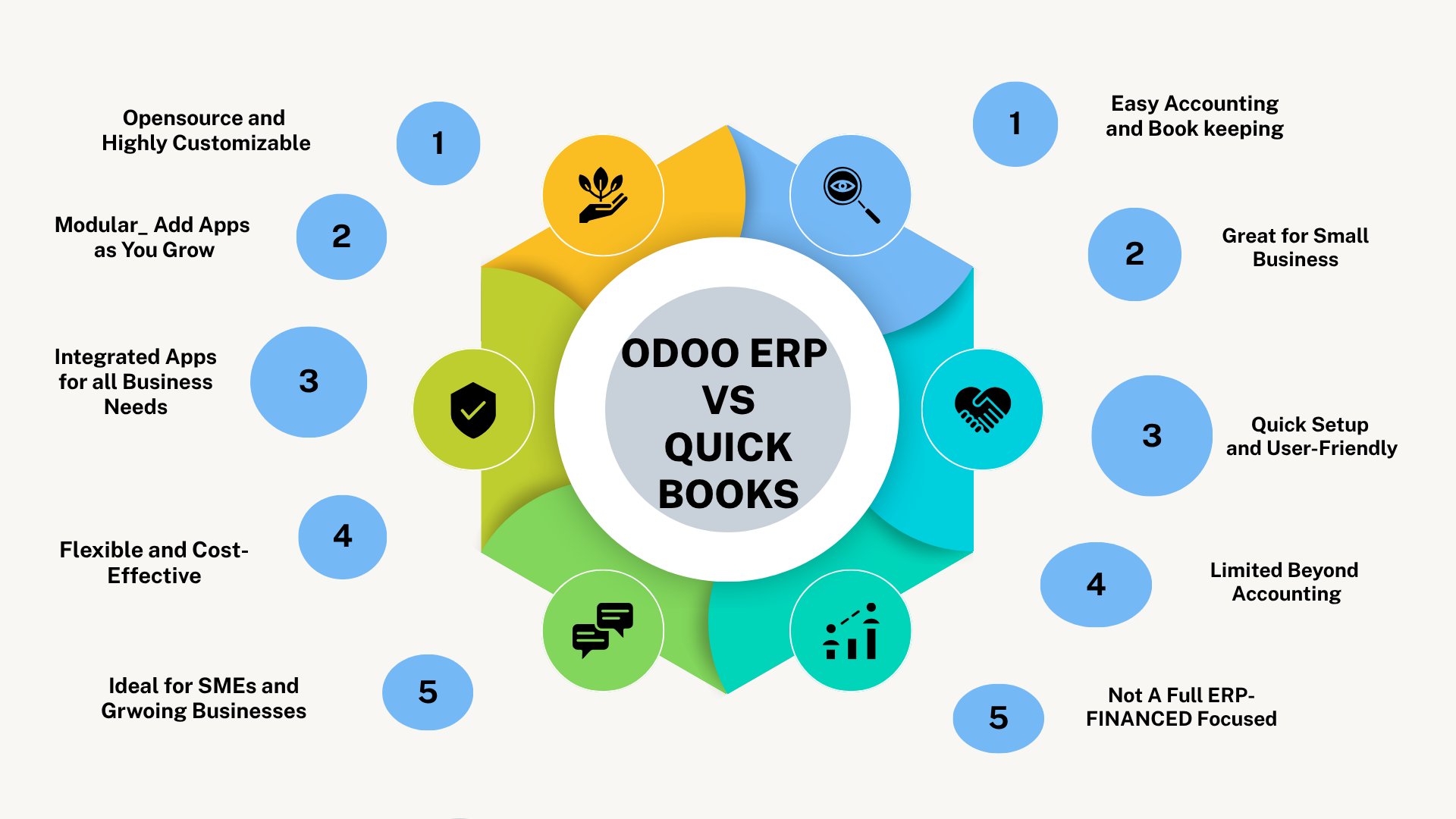
Odoo vs QuickBooks is primarily a comparison between a full business-management/ERP suite and accounting-focused software. Odoo integrates finance with CRM, sales, inventory, manufacturing, projects, HR, and other operations, while QuickBooks is centered mainly on accounting and financial management.
Accounting
Both platforms support core financial processes. Odoo includes accounting as part of its wider integrated application suite, while QuickBooks' accounting platform focuses strongly on bookkeeping, invoicing, expenses, tax, and financial reporting.
Business Operations Coverage
Odoo's integrated business applications extend beyond finance into sales, CRM, purchasing, projects, e-commerce, inventory, manufacturing, and HR. QuickBooks offers additional operational tools, but accounting remains at the center of its platform.
CRM, Inventory, and Manufacturing
Odoo provides dedicated CRM, inventory, and manufacturing applications within the same ERP environment. QuickBooks Online provides inventory tracking capabilities, while QuickBooks Enterprise also offers manufacturing-specific functionality, but its overall scope remains more finance-led than Odoo's broader ERP architecture.
Scalability
Odoo can expand through additional applications, users, workflows, and business processes as operational complexity grows. QuickBooks can support expanding financial requirements, but businesses needing deeper cross-department automation may require a broader ERP environment.
When a Business May Outgrow Accounting-Only Software
A business may consider moving beyond accounting-focused software when it needs integrated CRM, manufacturing, advanced inventory workflows, process automation, or centralized operations across multiple departments. In these cases, Odoo's broader ERP scope becomes more relevant than comparing accounting features alone.
Odoo vs Other ERP Systems by Key Criteria
Which ERP Offers More Customization?
Odoo stands out for flexible customization, especially through custom modules, Studio, and API access available in its Custom plan. SAP supports structured enterprise extensibility through SAP BTP, NetSuite supports custom records and SuiteCloud tools, while Dynamics 365 benefits from Power Platform-based customization.
Which ERP Is Easier to Integrate?
Odoo supports native apps and external APIs, while SAP offers extensive enterprise connectivity through Integration Suite. NetSuite supports REST web services, and Dynamics 365 integrates strongly with Microsoft 365, Dataverse, Power Apps, Power Automate, and Power BI.
Which ERP Is Easier to Use?
Odoo emphasizes a unified interface across integrated applications. Dynamics 365 can feel familiar to Microsoft users, while SAP and NetSuite usability depends more heavily on configuration, process complexity, and user roles.
Which ERP Scales Better?
Odoo suits modular business growth, while SAP is particularly strong for complex enterprise-scale operations. NetSuite supports growing cloud-based and multi-entity organizations, and Dynamics 365 can scale from Business Central to broader enterprise applications.
Which ERP Is More Cost-Effective?
There is no universal winner. Odoo's official pricing structure can make costs easier to understand, but true cost-effectiveness depends on licensing, implementation, customization, integrations, maintenance, and the functionality actually required.
Which ERP Is Faster to Implement?
Implementation speed depends more on scope than brand. Fewer modules, clean data, limited integrations, and standard workflows usually reduce implementation effort, while heavy customization and complex enterprise processes increase it.

Which ERP Is Better for Different Business Types?
The right ERP depends on business size, process complexity, customization needs, existing technology, and growth plans rather than one platform being universally better.
Small Businesses
Odoo can fit small businesses that want accounting, CRM, sales, inventory, and other functions on one modular platform. Odoo officially positions its ERP for businesses ranging from micro to larger companies.
Growing Businesses
Odoo is particularly relevant when businesses need to add users, modules, automation, and workflows gradually. NetSuite and SAP Cloud ERP are also options when growth brings more structured financial, operational, or multi-entity requirements.
Mid-Sized Businesses
Mid-sized organizations should compare Odoo, NetSuite, SAP, and Dynamics 365 based on process complexity. Microsoft specifically positions Business Central for small and mid-sized organizations, while NetSuite supports broader cloud and multi-entity operations.
Large Enterprises
SAP becomes especially relevant for organizations requiring deep enterprise processes, complex integrations, governance, and large-scale transformation. SAP distinguishes offerings for growing businesses from solutions designed for large-enterprise transformation.
Businesses Already Using the Microsoft Ecosystem
Dynamics 365 is a strong consideration when Microsoft 365, Power Platform, and related Microsoft technologies are already central to operations. Business Central connects with other Microsoft applications, reducing the need to build a completely separate ecosystem.
Businesses Requiring Heavy Customization
Odoo is particularly relevant for customization-heavy requirements because of its open-source foundation, modular architecture, and ability to develop tailored modules. Its official ERP overview specifically highlights tailoring the platform for more complex requirements.
Odoo vs SAP vs NetSuite vs Dynamics 365: Comparison Table
The main differences between these ERP platforms come down to customization, ecosystem, scalability, implementation complexity, and business requirements.
Criteria | Odoo | SAP Cloud ERP | Oracle NetSuite | Dynamics 365 |
Customization | High flexibility; open-source foundation, Studio and custom modules | Extensive enterprise extensibility with structured governance | Configurable and extensible within its cloud SaaS environment | Strong customization through extensions and Microsoft Power Platform |
Modularity | Add business apps as requirements grow | Modular enterprise capabilities and processes | Unified cloud suite with additional modules | Application-based Microsoft business ecosystem |
Functionality | Accounting, CRM, sales, inventory, manufacturing, HR, projects and ecommerce | Deep finance, supply chain, procurement and enterprise operations | Strong financial, inventory, order, supply chain and multi-entity functionality | Finance, sales, operations, supply chain and manufacturing, depending on product |
Integration | Native apps plus APIs and third-party connectivity | Broad enterprise integration ecosystem | Cloud integrations, SuiteApps and web services | Strong Microsoft 365, Power Platform and Azure ecosystem integration |
Ease of Use | Unified interface across integrated applications | Depends heavily on process and implementation complexity | Structured cloud ERP experience | Familiar environment for many Microsoft-based organizations |
Scalability | Strong for modular and growing-business expansion | Strong for complex, large-scale enterprise operations | Strong for growing and multi-entity organizations | Scales from SMB-focused Business Central to broader enterprise applications |
Implementation Complexity | Varies with modules, integrations and customization | Can be substantial for complex enterprise transformations | Depends on configuration, integrations and organizational scope | Varies significantly by Dynamics product and customization |
Pricing Model | User-based plans with implementation/customization considered separately | Subscription and contract structure varies by solution and scope | Cloud subscription/licensing influenced by users and requirements | Application/user-based licensing |
Best-Fit Business Type | SMEs and growing businesses needing flexibility and customization | Large or complex enterprises requiring deep process capabilities | Growing, mid-market and multi-entity cloud-focused businesses | Organizations prioritizing Microsoft ecosystem integration |
The comparison should not be read as a universal ranking. Odoo emphasizes modularity and customization, SAP enterprise depth, NetSuite a unified cloud ERP model, and Dynamics 365 Microsoft ecosystem connectivity; the best fit depends on business processes, existing technology, growth requirements, and implementation capacity.
FAQs
Is Odoo better than SAP?
It depends on business needs. Odoo is often better suited to businesses prioritizing flexibility, modularity, and customization, while SAP is stronger for complex enterprise-scale operations.
What is the main difference between Odoo and NetSuite?
Odoo emphasizes open customization and modularity, while NetSuite follows a more structured cloud SaaS ERP model.
Is Odoo better than Microsoft Dynamics 365?
Odoo may suit businesses needing a flexible integrated suite, while Dynamics 365 is especially strong for companies already using the Microsoft ecosystem.
Is Odoo suitable for growing businesses?
Yes. Odoo can scale through additional users, modules, workflows, and integrated business applications as operational needs increase.
Which ERP is more cost-effective: Odoo, SAP, NetSuite, or Dynamics 365?
There is no universal answer. Cost-effectiveness depends on licensing, implementation, customization, integrations, maintenance, and the functionality the business actually needs.